
Health Wallet
Mobile Applicaiton
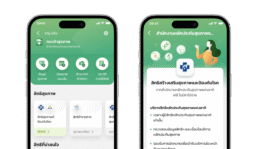
Overview
Princ Health is an application that connects to affiliated hospitals of the Principle Healthcare group to provide patients with greater convenience for medical care service.
My Role
- Lead the design for the whole project
- Understands and improve current usage flow
- Developed and maintained a design system
- Interface Design
Overview
Health Wallet is a mobile application designed for Thai users, offering easy access to health information and medical records. Users can verify their medical rights, manage appointments, and simplify financial transactions, including payments and reimbursements for medical expenses. This solution is designed to ensure a streamlined and efficient healthcare experience, enhancing accessibility and convenience for users in Thailand.
Challenge
In this context, the main focus is to address the hospital’s challenge of being unable to claim reimbursements from the government.
Our business requirement is to develop a solution that not only resolves this issue but also establishes a dedicated payment channel for these hospitals.
To achieve this goal, my role involves conducting research and ideating a solution that effectively addresses the challenges hospitals face in claiming government reimbursements.
Approach applied in this work
Research
User Flow
User Interview
Usability Test
Define Problem
Research
After gathering business requirements, I analyzed the user flow at hospitals. One identified problem is the hospital’s inability to claim government reimbursements if the user does not complete the payment process.
Examining the service flow revealed that after an examination, if a patient requires medication, they must visit the pharmacist and make a payment.
However, if the patient only undergoes an examination without requiring medication, they may not realize they need to visit the financial department, even though their Civil Servant Medical Benefit Scheme (CSMBS) covers all payments. They are required to visit the financial department to sign the necessary documents.
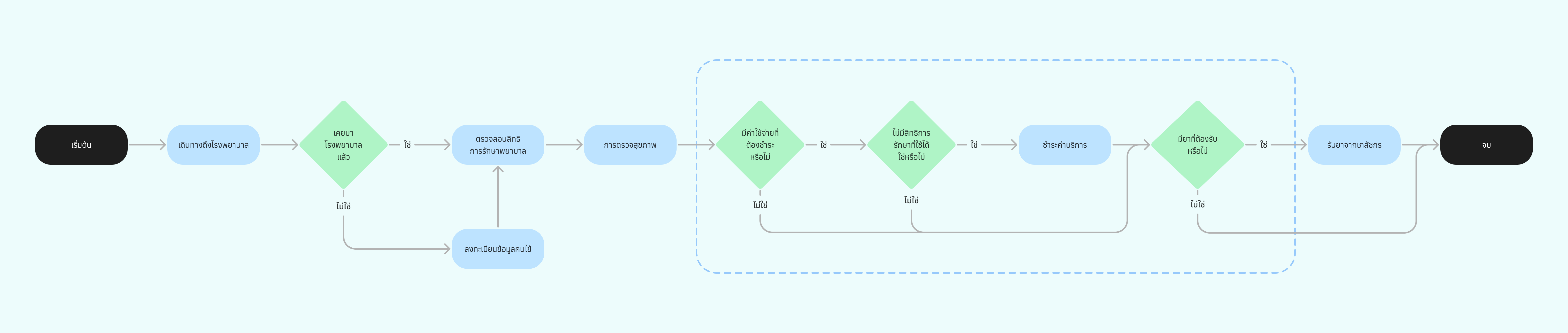
Image showcasing the service flow of users visiting the hospital – click to enlarge.
Taking a closer look at the highlighted section in the image reveals that after the examination, if the patient does not have take-home medication, there is potential to confirm this through an alternative channel without visiting the hospital’s financial department.
User Persona
During the research phase, I gathered more information about users who have CSBMS benefits and have used them at least once at a hospital. After creating a persona to match our requirements, it aligns with the following characteristics
- Age between 35-65.
- Currently working in or previously worked in the government sector.
- Has experience using CSBMS benefits at least once.
User Interview
To gain a deeper understanding of the current process, we conducted interviews with users who matched the personas we had gathered.

Users background and existing behavior based on current usage at the hospital – click to enlarge.
Usability Test
We created two scenarios based on this situation to test users’ interactions with the current hospital process.
- Scenario 1: Submit reimbursement claims through Health Wallet.
- Scenario 2: Access and review reimbursement claim history.

Usability testing results – click to enlarge.
Mapping Test Results to Screens
From the usability testing results, we mapped usage problems to specific screens for better understanding.

Scenario 1: On-screen mapping – click to enlarge.

Scenario 2: On-screen mapping – click to enlarge.
Findings
After completing usability testing and mapping all the results to screens, we summarized our findings as follows.

Results of findings – click to enlarge.
Prioritizing Usability Issues
Before moving to the ideation phase to determine which problem to address first, we prioritized the issues based on usability problems.

Sorting usability issues – click to enlarge.
Solution
From our empathize and define phases, we gathered key usage information from our users to prioritize the problems that need to be addressed first in the new reimbursement claim flow.
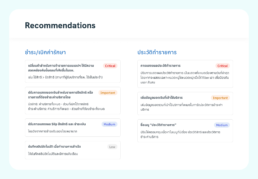
Recommendations highlighting problems identified during usability testing, prioritized by usage – click to enlarge.
From the image above, the areas for improvement can be prioritized into four categories: critical, important, medium, and low.
For Payment/Claim:
- The wording used in the Health Wallet should align with the offline processes that users are already familiar with at the hospital.
- The financial amount should display the total amount first, with detailed information available on a separate page.
For Payment/Claim History:
- The default sorting should be from newest to oldest, and all history should be displayed initially without being filtered.
- The financial amount should also be displayed in the history, making it easier for users to locate it after completing a claim or payment process.
Conclusion
Apart from these results, which I will communicate with the product owner, business team, and development team to help achieve the desired outcomes, there are additional opportunities worth exploring to address specific problems and make further improvements:
- Users mentioned that it would be helpful if they could book an appointment before visiting the hospital, as they often face long queues before starting the medical check-up process.
- It would be beneficial if users could check the availability or the number of people present at the hospital daily, allowing them to plan their visit more effectively.
- While payments and claims can already be made through Health Wallet, there is an opportunity to improve the service process. If a patient does not require medication, we could modify the process flow to confirm the patient’s rights immediately after the medical examination. This would help reduce congestion in the financial department.